How to Add Autonomous Workflows to SAP Supply Chains (7 Steps)

You add autonomous workflows to an SAP supply chain by putting an AI layer on top of your mailbox and SAP, not by migrating or replacing anything. Audit where manual exception work happens, pick one high-volume process (PO confirmation is the usual first win), connect through a lightweight API, run in shadow mode, then switch high-confidence cases to autopilot. Live in weeks; 90%+ autopilot typically in about six.
SAP handles the structured work. The hours disappear in the messy middle between the ERP and operations: PO confirmations arriving by email, invoice exceptions needing manual triage, supplier messages scattered across inboxes. Here's how to automate that gap without an IT project.
Quick guide: the 7 steps
- Audit your current exception handling.
- Identify the high-volume, repetitive tasks.
- Map the data flows and human handoffs.
- Establish the SAP integration points.
- Configure the autonomous-workflow rules (confidence thresholds).
- Deploy and calibrate the AI layer in shadow mode.
- Monitor performance and redirect capacity.
1. Audit your current exception handling
Document where time actually goes: open inbox, read the PO, find the article number, check the quantity, match against the ERP, book the line, repeat. Walk each exception type with your team (invoice mismatches, missing goods receipts, currency discrepancies) and log one week of exception type, time spent and outcome. That baseline is how you'll measure impact.
Count documents, not hours, and note the outcome beside each: matched the PO exactly, needed one field corrected, needed an email to the supplier first. That third bucket is the expensive one. Manual supply-chain touchpoints often run $30–50 per transaction once you count the query, the wait and the rekeying. SAP supply chain automation is easy to feel and hard to prove; this is the week that makes it provable.
2. Identify the high-volume repetitive tasks
Focus on work in the middle zone: too structured for "it needs a human," too unstructured for RPA that breaks when a column moves. Typical candidates: PO confirmations arriving as varied email formats, three-way matching across PO/goods receipt/invoice, supplier follow-ups for missing confirmations, and exception triage. Rank them by volume and time. That's where the hours are.
Then pick one. Not three. Start where line volume is highest and the decision set narrowest, which in most SAP shops means SAP purchase order automation on the confirmation side: the document arrives unprompted, it maps onto rows that already exist in EKKO/EKPO, and the decision is a comparison against tolerances you can write in three lines. Accounts-payable exception work pays more per case but reaches into FI, approval routing and blocked-invoice release. Do that second.
3. Map the data flows and handoffs
Trace a PO from creation to payment: SAP generates it, it goes to the supplier by email or EDI, the confirmation lands in an inbox, a person re-keys the data into SAP. Every point where a human is the glue between systems is an automation opportunity. A simple diagram of source, document type, destination and current method guides the setup.
Be strict about the document-type column, because "email" is not a document type. Split it into PDF attachment, body text, Excel sheet, scan of a printout. Then ask what happens when nothing arrives: who notices on day three that a confirmation is missing, and what do they do? Supplier communication rarely appears on a process map and is often a quarter of the load: the chase, the query, the reply that lands four days later in a different thread.
4. Establish the SAP integration points
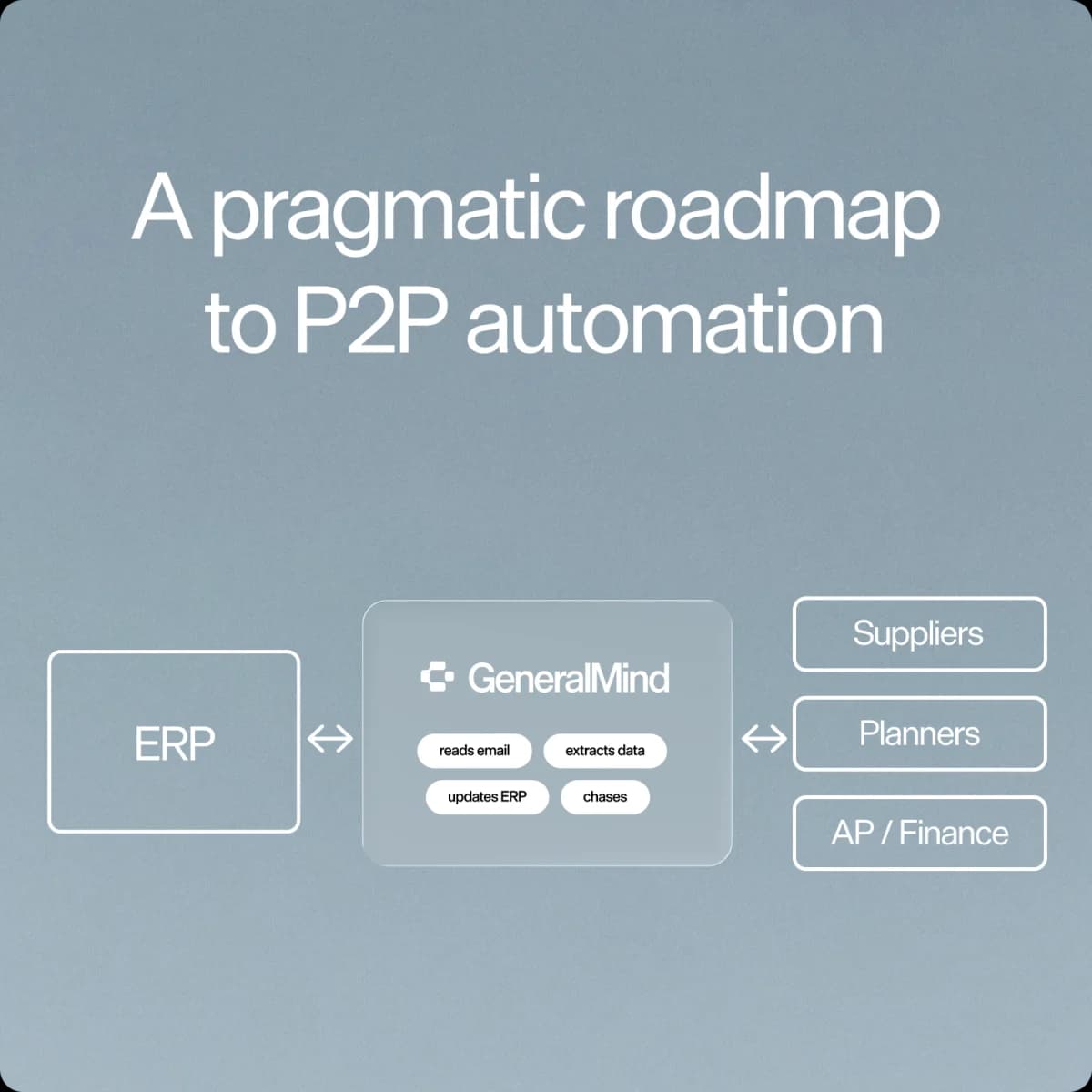
This is a small, standard integration. Not a migration. In practice it's a lightweight REST API plus mailbox access; GeneralMind ships ECC-compatible connectors that also carry over to a later S/4 migration, and uses standard SAP interfaces (BAPI/RFC for transactions, IDocs for document flows) where a use case needs them. GeneralMind adapts to the interfaces your instance already exposes and maintains them itself. Set up a dedicated API user with your basis team for clean authorizations and audit trails. Keep IT in a short technical call early, and don't commit to a specific number of person-days without engineering sign-off.
What your basis team actually does
One API user with read access to the purchasing and invoice objects from step 3, write access scoped to the transactions the workflow posts, and access to the mailbox your suppliers already write to. Authorizations consume the calendar time here, not the connection. That user also separates machine postings from your team's, which is the first thing an auditor asks for. Say two things out loud in the call: the ERP is not modified, and the write path is narrower than the read path. Most of the resistance in the room is aimed at a rebuild nobody proposed.
5. Configure the autonomous-workflow rules
Set the decision logic: when confidence is high, the system books directly; when something is ambiguous, it routes to your team with context and a drafted response. That is a judgment call, not an error code. Configure tolerances for quantity, price and delivery-date variance, starting tight and widening as trust builds. At Klöckner, this logic books 81% of order lines with zero human edits.
Tolerances first, confidence second
These are two dials, not one. A tolerance says a 2% price increase is acceptable on this material group; a confidence score says how sure the system is that it read 2% and matched the right PO line. Set the tolerances with procurement: quantity variance by material group, the price corridor from the contract, how far a confirmed delivery may move before a person looks at it, which is not the same answer for a stock item as for a production-critical line. This is the part people mean by ERP workflow automation. Not the connection. The decision logic.
Start tighter than feels necessary. A threshold that routes too much costs your team an hour of review a day; one that books too much costs credibility you then spend weeks earning back.
6. Deploy and calibrate in shadow mode
No IT project, no six-month timeline. Connect the inbox, configure recognition for your formats, establish the SAP connection, then run in parallel with your team before anything writes to SAP. This calibrates the confidence score against real accuracy. Pre-trained models reach roughly 85% straight-through from day one, rising to 93–95% within weeks as the system learns your article numbers, supplier naming and layouts. You then switch high-confidence transactions to autopilot; 90%+ autopilot in about six weeks is the typical experience, not a guarantee.
Run that parallel phase properly, because it is the entire safety argument. Live documents in, the booking the system would have made out, nothing reaching SAP. Where its output and your team's agree at high confidence, you have found the autopilot population. Where it was confident and wrong, you have found a master-data gap or a tolerance that lives in someone's head in a different form than in the config. Nobody signs off on AI on SAP because of a demo; they sign off because a fortnight of shadow output matched their own team's decisions.
Where the six weeks slips
That timeline assumes the dull things go right: someone on your side owns the project, the API user exists in week one, and the person who knows why one supplier's confirmations are odd is reachable. When it slips, it is almost never the model. It is authorizations waiting on a change window, or a master-data cleanup nobody scheduled.
7. Monitor performance and redirect capacity
Track the share of transactions processed without human touch, time from receipt to SAP posting, exception rate by category, and hours recovered. At production deployments, teams reclaim roughly 60% of manual processing time in the first three months. The goal isn't to cut headcount. It's to redirect capacity to supplier relationships, escalations and the work that needs judgment. Dashboards for open POs, spend and exception queues let the team manage by exception.
Build that view before go-live, not after: your step 1 baseline plus the same numbers every Monday is the business case, and much harder to assemble retroactively. Watch the mix inside the exception queue rather than its length, because a queue that stays the same size but shifts from "couldn't read the format" to "supplier disputes the price" has improved. Tell the team what the reclaimed hours are for before the first transaction goes live. At Oatly, around 80% of roughly 2,500 orders a month run on autopilot, and the people who used to key them now work the fifth of cases where somebody has to decide something.
What SAP exceptions can autonomous workflows handle?
Three-way matching automation is the cleanest case, because the rule is already written down: PO, goods receipt and invoice have to agree inside tolerance, and when they do the posting is mechanical. What blocks it is rarely the rule: one of the three arrives late, a partial delivery split one PO line into two receipts, or the invoice quotes the supplier's document number instead of yours.
Structured exceptions that follow patterns: invoice mismatches within tolerance get resolved and posted; missing goods receipts trigger automated supplier follow-ups; currency variances above threshold route for review. Blocked invoices, three-way-matching variances and threshold-based approval routing are the highest-value targets, all inside procure-to-pay. Genuine judgment calls (disputed charges, new-supplier onboarding) are drafted and routed to your team. Humans keep the judgment; the repetitive work goes away.
Why traditional RPA fails on SAP supply chain exceptions
RPA breaks when inputs vary: a confirmation as an email attachment instead of EDI, a shifted Excel column, a goods receipt in German. Those variations happen constantly, and template-bound scripts fail the moment formats change, so you end up maintaining scripts with IT for every supplier tweak. Autonomous workflows parse intent, not just structure: they recognize that "PO Number," "Purchase Order #" and "Bestellnummer" mean the same field, handling the messy reality of multi-supplier, multi-format communication.
How GeneralMind helps
GeneralMind deploys AI Employees that read POs and invoices in any format, whether email, PDF, Excel or scans, match them to your SAP master data, and book ERP-ready transactions end to end. Routine cases run on autopilot; exceptions escalate with a pre-drafted response. At Klöckner, 81% of order lines book with zero human touch across 1,100+ PO lines a week. You go live in weeks and pay per transaction only at go-live, with no upfront cost.
Frequently Asked Questions
No. GeneralMind works on customized ECC today, with connectors that carry over to a later S/4 migration.
Typically MM, FI and SD. The workflow reads and writes PO data (EKKO/EKPO), invoice headers (RBKP) and accounting documents (BSEG) via standard BAPI/RFC/IDoc connectivity. It's a standard integration, not a rebuild.
Nothing is written below your confidence threshold; those cases go to an operator with a drafted response, and every action is auditable.
Yes, it parses document intent in German, English and other languages, matching fields regardless of the label used.
Long enough for the system to have seen each high-volume supplier several times, rather than a fixed number of days. You compare its proposed bookings against what your team actually did, and move the population where the two agree at high confidence onto autopilot first.
Weeks to first autopilot transactions; 90%+ autopilot on the first process in roughly six weeks as the system learns. That is typical experience, not a guarantee.